Handling Videos
Not yet GA. Please contact us if you are interested.
Spiral stores video as a source blob plus a compact H.264 index. The source stays in object storage, while the index records enough container and codec metadata to plan sparse frame reads without reparsing the MP4 for every scan.
The current video path is intentionally focused:
- H.264 / AVC video in MP4 containers
- write-time indexing through
se.Video(se.Blob(...)) - scan-time frame decode through
se.video.read(...) - MP4 preview generation through
se.video.remux(...) - optional exact-cadence transcoding for prefix-readable training artifacts
Why Index Video
Random frame access in compressed video is not a direct byte lookup. A requested display frame may depend on earlier or later reference frames in decode order, and those reference frames may live in separate MP4 samples. Spiral’s video index captures that frame graph once at write time.
The index stores:
- sample byte offsets and lengths
- display-order and decode-order frame positions
- presentation timestamps and durations
- sync samples and GOP boundaries
- active H.264 reference dependencies
- precomputed decode closures for sparse planning
With that index, scans can request a small set of display frames and fetch only the compressed byte ranges needed to decode those frames.
Install
pip install pyspiralThe optional H.264 transcode path uses the external GPL-separated spiral-h264 encoder bridge:
pip install 'pyspiral[h264]'For local development, SPIRAL_H264 or SPIRAL_H264_BIN can point at a local spiral-h264 binary.
Write Videos
Use se.Video(se.Blob(...)) when writing MP4 payloads. Spiral stores a canonical video struct with two fields:
source: the source blobindex: the generated video index
from spiral import Spiral, expressions as se

sp = Spiral()
clips = sp.project("training").table("clips")

clips.write(
    {
        "clip_id": clip_ids,
        "label": labels,
        "video": [se.Video(se.Blob(payload)) for payload in mp4_payloads],
    }
)
This shape keeps source media and planning metadata together. Reads can choose frames from video.index, then fetch bytes
from video.source.
Decode Frames In A Scan
Use se.video.read(...) in the scan projection. It decodes selected frames on CPU and returns a struct containing RGB
frame bytes plus frame metadata.
from spiral import Spiral, expressions as se

sp = Spiral()
clips = sp.project("training").table("clips")

scan = sp.scan(
    {
        "clip_id": clips["clip_id"],
        "label": clips["label"],
        "video": se.video.read(clips["video"]),
    }
)

loader = scan.to_data_loader(batch_size=32)
Each video value contains:
frames: per-frame records with packeduint8RGB bytes and timing metadataframe_shape:[height, width, 3]
Map this result to Torch tensors in your loader transform.
Pass a list column or auxiliary expression as the second argument when you want sparse frame selection.
import pyarrow as pa
from spiral import expressions as se

frame_indices = se.aux("frame_indices", pa.list_(pa.uint32()))

scan = sp.scan(
    {
        "clip_id": clips["clip_id"],
        "frames": se.video.read(clips["video"], frame_indices, height=224, width=224),
    }
)

key_table = pa.table(
    {
        "clip_id": [101, 202],
        "frame_indices": pa.array([[0, 8, 16, 24], [4, 9, 15]], type=pa.list_(pa.uint32())),
    }
)

batch = scan.to_table(key_table=key_table)
Sparse Access Model
The simplest video layout is a baseline P-chain: later frames depend on earlier references. Accessing one frame can require fetching the nearest preceding key frame and every compressed sample needed to reach the target.
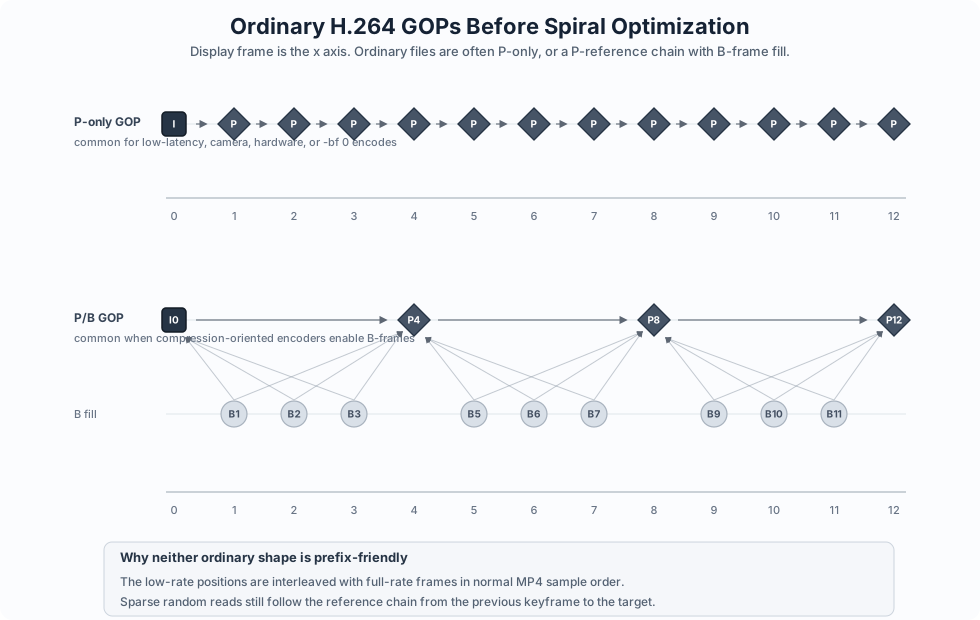
Spiral’s index lets the scan planner compute that decode closure explicitly. For random access, the scan fetches only the byte ranges for the selected closure instead of reading the whole MP4.
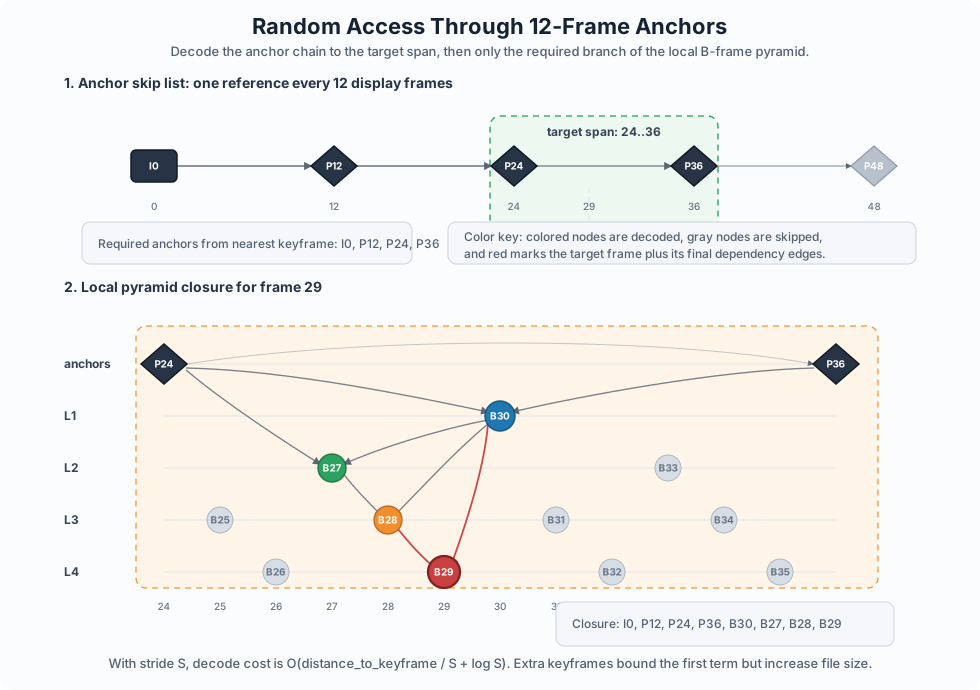
The planner can choose between exact merged sample ranges, a widened contiguous span, or a full touched-GOP span. The right choice depends on storage backend behavior, range-count limits, and the overfetch ratio for the selected frames.
Remux MP4 Previews
Training jobs usually do not want playable MP4s in the hot path. se.video.read(...) returns decoded frames for model
input. Remuxing is a convenience feature for previews, debug clips, and API responses.
se.video.remux(...) is a scan projection expression. It takes the selected H.264 decode closure and writes a new MP4
payload without re-encoding pixels.
import subprocess
import sys
from pathlib import Path

import pyarrow as pa

from spiral import Spiral, expressions as se

sp = Spiral()
clips = sp.project("training").table("clips")

frame_indices = se.aux("frame_indices", pa.list_(pa.uint32()))

scan = sp.scan(
    {
        "clip_id": clips["clip_id"],
        "preview_mp4": se.video.remux(clips["video"], frame_indices),
    }
)

key_table = pa.table(
    {
        "clip_id": [101],
        "frame_indices": pa.array([[0, 8, 16, 24]], type=pa.list_(pa.uint32())),
    }
)

result = scan.to_table(key_table=key_table)
preview_mp4 = result["preview_mp4"][0].as_py()

output_path = Path("preview.mp4")
output_path.write_bytes(preview_mp4)

open_cmd = "open" if sys.platform == "darwin" else "xdg-open"
subprocess.run([open_cmd, str(output_path)], check=True)
This is cheap compared with transcoding because it copies the selected compressed samples into a new MP4 container. It is still extra work, so it belongs in preview and export flows rather than the training inner loop.
Exact-Cadence Transcoding
Sparse reads help when the source video already has a favorable frame graph. Training datasets often need a stronger property: keep the full-rate asset, but make an exact lower-rate view cheap to read.
The production-oriented path is an exact-cadence transcode:
- keep the full-rate cadence, for example
30 fps - retain one or more exact lower-rate cadences, for example
10 fps - make retained lower-rate frames decode-closed
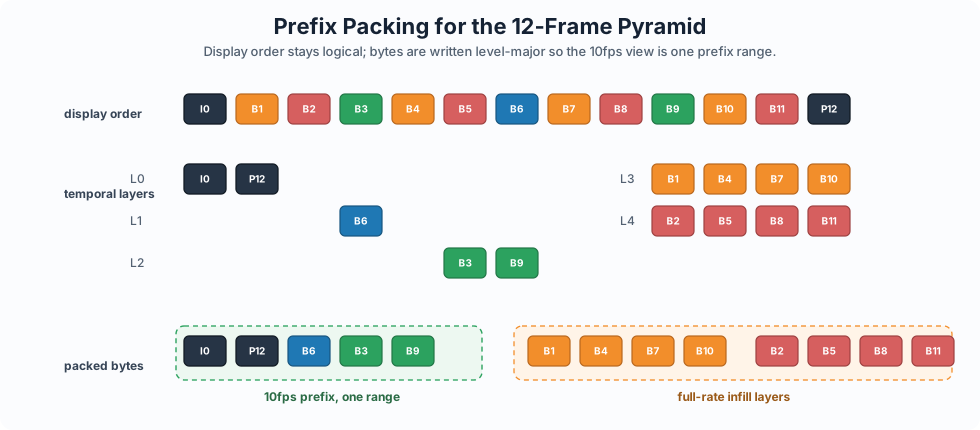
- pack the MP4 so a retained cadence can be read as a file prefix
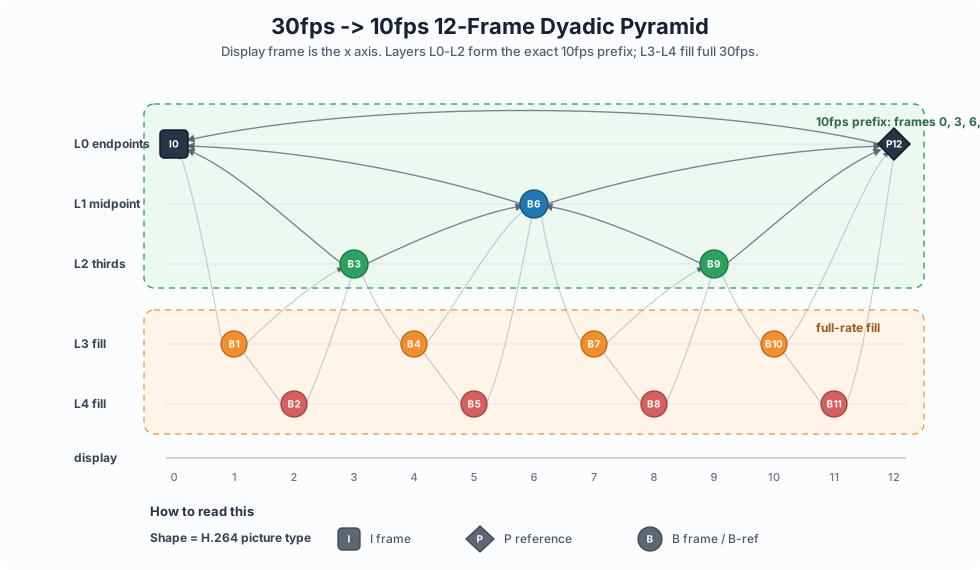
For the common 30 -> 10 case, the retained frames are the original display positions 0, 3, 6, .... The encoder must
avoid making those retained frames depend on frames that are omitted from the 10 fps view.
spiral video transcode input.mp4 \
  --output /tmp/out.transcode.mp4 \
  --fps 10 \
  --quality 25 \
  --size 1280x720 \
  --preset medium
If --output is omitted, the CLI writes next to the input as <stem>.transcode.mp4. The result is a prefix-readable
MP4. Lower temporal layers are packed first, so a lower-rate view can be served by reading a prefix rather than a
separate file. The full-rate source cadence is always kept; --fps names the lower cadences that should be cheap to
read.
Exact-Cadence Frame Graph
The exact-cadence encoder schedule is deterministic. Given a source frame rate F and requested FPS ladder R, Spiral:
- adds the full source rate to the ladder, then sorts and deduplicates it from high to low;
- requires every lower rate to divide the next higher rate exactly;
- converts each rate to a display-frame stride with
stride(rate) = F / rate; - chooses an anchor period
Anear 12 display frames, constrained by the coarsest stride and x264’s B-frame reorder limit.
For F = 60 and --fps 60,30,10,5, the strides are:
5fps  -> 12
10fps -> 6
30fps -> 2
60fps -> 1
The repeated closed interval is therefore 12 display frames. Each normal interval [L, R] is built as a P-anchor edge
from R to L, followed by layer-major B-frame refinement. For each stride, Spiral finds display frames inside
(L, R) that match the stride and are not already retained. Within each current retained gap, it emits the median
candidate as a B frame referencing the two gap endpoints, then marks any B frame that is later referenced as a B-ref.
Unreferenced fill frames remain disposable B frames.
For one 60 -> 30 -> 10 -> 5 interval, the intended local graph is:
P12 refs 0

B6  refs 0,12
B2  refs 0,6
B8  refs 6,12
B4  refs 2,6
B10 refs 8,12

B1  refs 0,2
B3  refs 2,4
B5  refs 4,6
B7  refs 6,8
B9  refs 8,10
B11 refs 10,12
This gives a large P-chain skip list through the GOP plus a local dyadic B-pyramid. A sparse read decodes the anchor chain up to the touched interval, then only the B-ref branch needed for the target frame. At a closed-GOP tail, where the next GOP’s IDR cannot be used as the right endpoint, retained cadence frames use a short forward P chain and the remaining full-rate frames are filled around that tail.
Use a deeper ladder only when it is valuable enough to justify the quality and validation cost:
spiral video transcode input.mp4 \
  --output /tmp/out.transcode.mp4 \
  --fps 10,5 \
  --quality 23,27 \
  --multi-track
Very low cadences create larger motion-prediction gaps. They can be useful, but they should be validated on the target dataset instead of treated as a free storage win.
--quality has two modes. A single value is x264 CRF. A comma-separated list is exact QP, aligned with the --fps
entries by position. Extra ffmpeg and x264 controls remain available as repeatable raw tokens:
spiral video transcode input.mp4 \
  --fps 10 \
  --quality 24 \
  --ffmpeg-arg=-t \
  --ffmpeg-arg=60 \
  --x264-param aq-mode=1
The patched encoder path lives behind the external spiral-h264 process. Spiral invokes ffmpeg to decode/filter the
source into Y4M, passes the schedule to spiral-h264, muxes the returned H.264 samples into MP4, then packs and indexes
the result.
Operational Notes
Use spiral video inspect to print the indexed frame graph for an input or transcoded artifact:
spiral video inspect /tmp/out.pyramid.mp4 --show-frames 24 --max-gops 2The video implementation is built around H.264 specifics rather than a codec-generic abstraction. That is deliberate: the planner needs execution-grade metadata, including reference dependencies and sample byte ranges, not just media file metadata.
For implementation details, see the spql-video crate.